
Carry On.
A little airport chaos. Four quick games. Room for one more go.
Free to download · Contains ads · Optional one-time purchases
Get Carry On on the App Store →
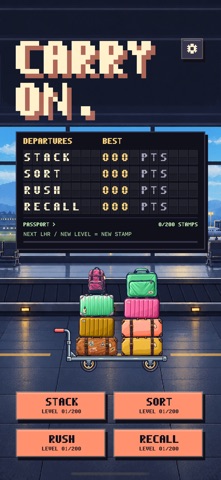
FOUR GAMES. ONE TERMINAL.
Time your drops. Keep the luggage balanced.
Read the airport code. Send each bag to its destination.
Move the trolley to catch the incoming luggage.
Watch the conveyor. Remember the items and their order.
Unlock levels by playing or chase a personal best in Endless. All four games include unlimited free restarts.
NEED A HAND?
For help, feedback or a bug report, email Aaron. Include your iPhone model, iOS version, app version and what happened. Screenshots can help; please leave out personal or sensitive information.
EMAIL SUPPORT >QUICK ANSWERS
How do I restore Remove Ads?
Open Settings from the home screen, choose Remove Ads, then Restore Purchases. Use the same Apple Account that made the purchase. It is a one-time purchase; it is not a subscription.
Do I need to pay for levels or retries?
All four games have levels you unlock by playing, with unlimited free restarts. The optional Remove Ads purchase removes advertising. Second Chance tickets are a separate purchase: they offer one recovery per level attempt, with the full goal still to complete. Endless stays unassisted.
How do Second Chance tickets work?
Start with three free tickets and earn another for every ten different levels cleared. An optional pack adds five tickets on iOS 18 or later; the app shows your local App Store price. iOS 17 still supports free and earned tickets. Buying adds tickets without using one automatically. A recovered clear can earn up to two stars; three stars require an unassisted clear. Tickets never expire.
Can I restore unused tickets on another device?
Tickets are saved in protected storage on this device. Restore Purchases restores Remove Ads, not a remaining consumable balance on another device. Erasing the device or losing its protected storage can lose unused tickets.
Where is my progress saved?
Scores, levels, Passport stamps and preferences are stored on your device. Deleting the app can remove that progress. Purchase restoration is managed separately by Apple.
How can I change sound, haptics or the background?
Tap the settings button on the home screen. Settings are also available while a game is paused.
What happens with my data?
Read the Carry On privacy policy for details about local progress, purchases, advertising and privacy choices.